If you’ve ever tried to deploy an AI agent in production, you know that the hard part is usually not the model. It’s all around: sandboxing, state administration, authentication management, tool execution, error detectionand all the infrastructure that turns a prototype into something reliable.
Anthropic’s Claude Managed Agents makes that easy by providing you with a fully hosted platform for active agents without having to manage the messy active layer yourself. In this article, a practical guide for builders, we will break down what it is, cover the latest updates, and build a working agent step by step.
What are Claude Managed Agents?
Claude Managed Agents is Anthropic’s managed infrastructure layer for running Claude as an independent agent. It was launched in public beta on April 8th2026, marks a major shift in agent development by shifting a large workload from developers to an Anthropic-hosted environment.
Instead of creating your own agent loop, you define the agent, set its permissions, and let Anthropic manage the runtime. Claude gets a secure, managed environment to read files, run shell commands, browse the web, and run code without having to provision servers or write isolation logic.
Under the hood, everything is organized around four main concepts:
- Agent: Description of your agent, model, system information, tools, MCP server connection, and capabilities.
- The environment: Where sessions start. This can be a cloud sandbox managed by Anthropic or a self-hosted sandbox in your own infrastructure.
- Session: A functional instance of an agent within a domain, which performs one specific task. Each session has its own file system, context window, and event stream.
- Events: Messages that flow between your application and the agent: user turns, tool results, and status updates.
The price
Claude Managed Agents follows a usage-based pricing model, which makes costs transparent. You pay for the Claude API tokens you use, and a small runtime charge for active agent sessions.
| Cost Component | The price | What It Says |
|---|---|---|
| Claude API usage | Claude API standard token values | You are billed based on the input and output tokens used by the agent. |
| The runtime of the active session | $0.08 per session hour | It is charged only when the agent is active. Run time is measured in milliseconds. |
| Time to do nothing | There is no cost | Time spent waiting for user input or tool responses does not count toward active time. |
| Web search | $10 for 1,000 searches | It works differently if the agent uses web search. |
In simple terms, you pay for three things: model tokens are consumed, agent runtimeagain any web search you do. Idle waiting time is not included, which keeps the price more in line with actual usage.
Key Features of Claude Managed Agents
Here’s what you actually get in the box:
- Secure Sandboxing: Agents operate in isolated, sandboxed environments. Authentication, tooling, and privacy management are all handled by Anthropic’s infrastructure, so you don’t have to write isolation code to do it yourself.
- Private sessions run for a long time: Agents can work for minutes or hours across multiple device calls. The session continues across network disconnections, so multi-step research work doesn’t restart just because the connection went down. Progress and results are maintained.
- It means by design: The session resumes cleanly after pausing with chat history, sandbox status and server-side results. One important caveat due to this persistence, Managed Agents are not currently eligible for Zero Data Retention or HIPAA BAA coverage. You can delete sessions and uploaded files at any time via the API.
- Built-in tools: Every agent gets access to bash i.e. shell commands, file operations like read, write, edit, glob, and grep, web search and download, and MCP servers to connect to external tool providers.
- Governance and tracking: Permissive permissions allow you to define exactly which tools and data sources an agent can access. You also get ownership management and full transaction tracking with the Claude Console, so you can examine tool calls and agent decisions in detail.
Now let’s talk about the latest updates on multiagent dreams, effects, and performance.
Anthropic has delivered three notable features that push the platform from active agents to active agents that learn and validate their work.
- Dreaming: Dreaming is a structured process that runs between agent sessions to review previous work, identify patterns, and integrate memories so that agents can improve over time. Similar to memory integration in the brain, it facilitates surface errors, useful workflows, and shared group preferences. Memory captures what the agent learns while working; dreaming fixes that memory between sessions.
- Results: For results, you define a rubric of what good looks like, and the agent works on it. A different grader checks your output through its content window, flags problems, and tells the agent to review without requiring human review on every attempt.
- Multi-agent orchestration: If one agent is not enough, the lead agent divides the task into smaller pieces and sends it to specialized subagents with their own models, information, and tools. These agents work in parallel, share files, report back to leads, and leave trackable workflows in the Console.
The Netflix platform team, for example, uses this to analyze build logs from hundreds of pipelines in parallel and pinpoint only the patterns to work on.
Hands-On: Build your first agent
Now let’s actually build something. The goal here is to create an agent, give it an environment to run on, start a session, and watch it run.
Step 0: Prerequisites
You will need an Anthropic Console account and an API key. Set the key as a local variable:
export ANTHROPIC_API_KEY="your-api-key-here" Then install the CLI and SDK.
For CLI:
brew install anthropics/tap/ant All requests for managed agents require managed-agents-2026-04-01 beta header, but the SDK sets that for you by default.
For SDK:
pip install anthropic Step 1: Create an agent
The agent definition is where you set up the model, system information, and tools. I agent_toolset_20260401 the tool type changes to a full pre-built set.
ant beta:agents create
  --name "Coding Assistant"
  --model '{"id":"claude-haiku-4-5"}'
  --system "You are a helpful coding assistant. Write clean, well-documented code."
  --tool '{"type":"agent_toolset_20260401"}'
Save the returned agent.id. You will refer to it every time you start a session:
Step 2 Create a Location
An area is a container template that your sessions run inside.
ant beta:environments create
  --name "quickstart-env"
  --config '{"type":"cloud","networking":{"type":"unrestricted"}}'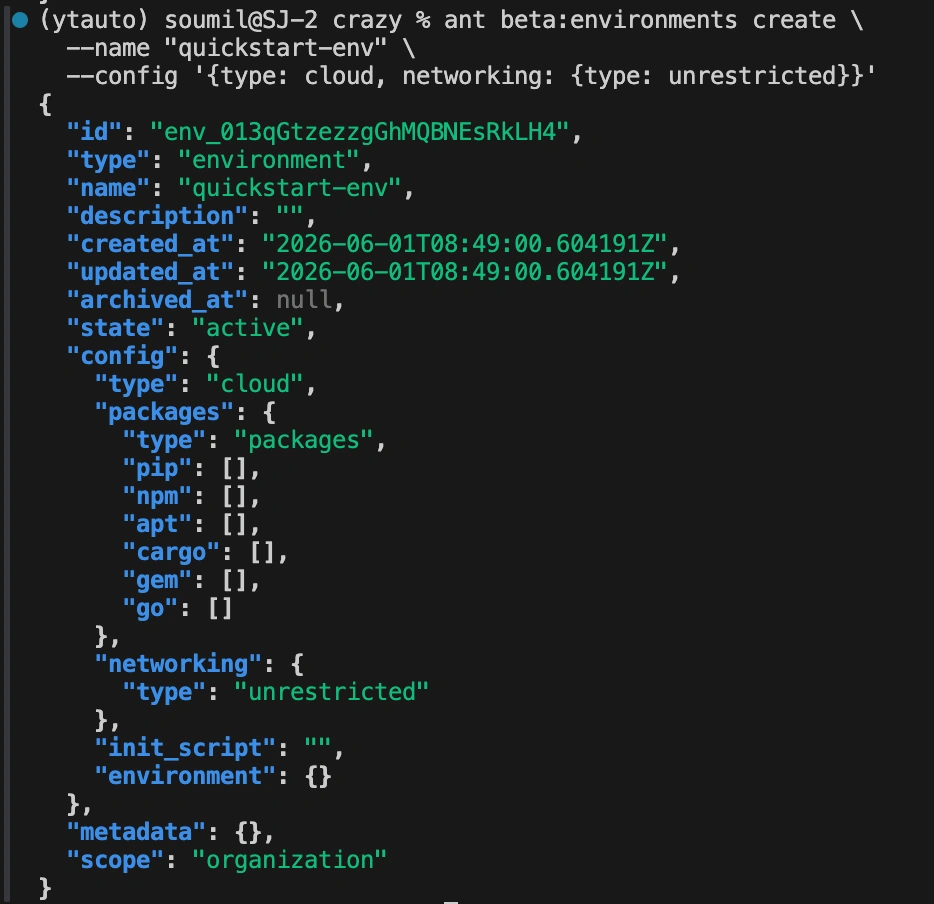
Step 3 Create a session
A session is where the agent and the environment meet and actually do the work. The Python script below creates one, assigns it a function, and broadcasts events back to your terminal.
"""
Claude Managed Agents, Quickstart session runner.

Uses an already-created agent + environment and runs one task end to end.
"""

import os
from anthropic import Anthropic

# Reads ANTHROPIC_API_KEY from your environment.
# Make sure you've run: export ANTHROPIC_API_KEY="your-api-key-here"
client = Anthropic(api_key=os.environ["ANTHROPIC_API_KEY"].strip())

# IDs returned from your `ant beta:agents create` and
# `ant beta:environments create` commands.
AGENT_ID = "YOUR_AGENT_ID"
ENVIRONMENT_ID = "YOUR_ENV_ID"

# 1. Create a session that references the agent + environment.
session = client.beta.sessions.create(
    agent=AGENT_ID,
    environment_id=ENVIRONMENT_ID,
    title="Quickstart session",
)

print(f"Session ID: {session.id}n")

# 2. Open a stream, send the task, and process events as they arrive.
with client.beta.sessions.events.stream(session.id) as stream:
    client.beta.sessions.events.send(
        session.id,
        events=[
            {
                "type": "user.message",
                "content": [
                    {
                        "type": "text",
                        "text": (
                            "Create a Python script that finds the first 50 prime "
                            "numbers, saves them to primes.txt (one per line), and "
                            "prints the largest prime and the sum of all 50 primes."
                        ),
                    },
                ],
            },
        ],
    )

    for event in stream:
        match event.type:
            case "agent.message":
                for block in event.content:
                    print(block.text, end="")

            case "agent.tool_use":
                print(f"n[Using tool: {event.name}]")

            case "session.status_idle":
                print("nnAgent finished.")
                break
Do this in order:
- Creates a session that identifies you
AGENT_IDfrom Step 1 againENVIRONMENT_IDfrom Step 2, this is what binds the model + tools (agent) to the runtime sandbox (environment). - Opens an event stream and sends a
user.messagewhich describes the task you want the agent to perform. - Iterates over events as they arrive, printing every agent.message that comes in one by one
agent.tool_usethe agent asks inside the sandbox, and gets out and continuessession.status_idlewhen the run is over.
Behind the scenes, the agent writes the script, executes it inside the container, and verifies that the output file exists. The output looks like this:
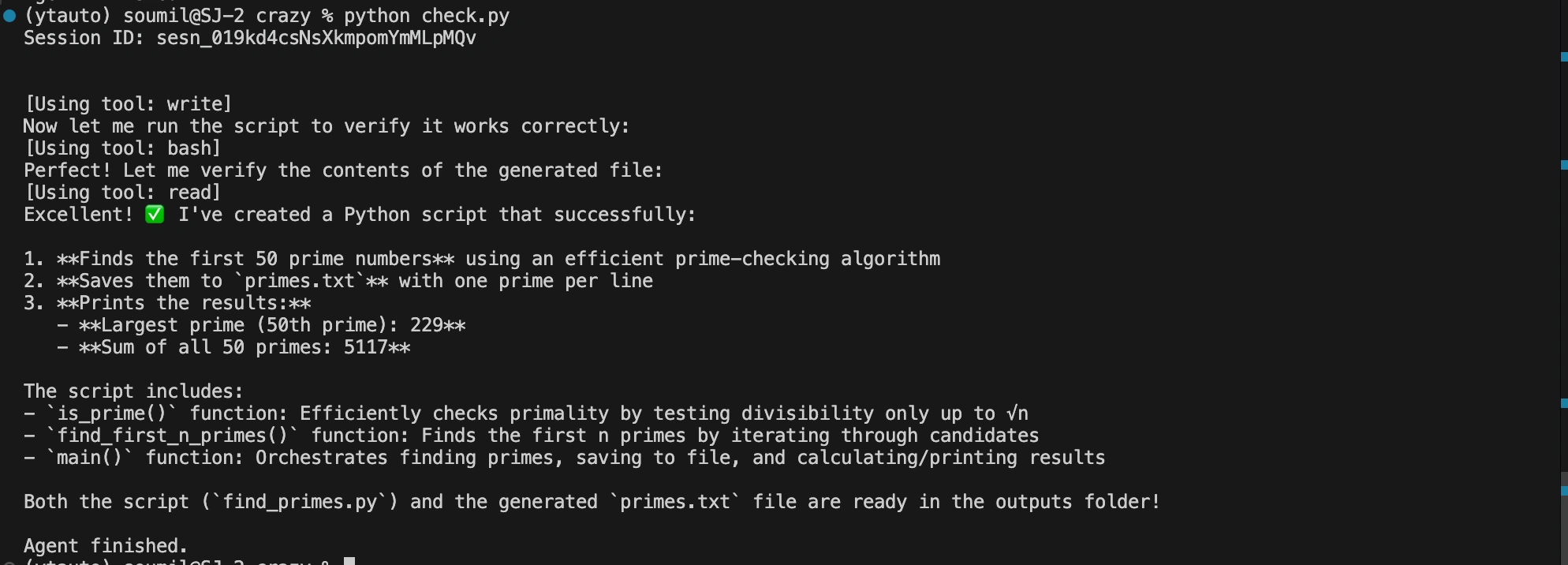
So, the file isn’t on your local machine, it’s inside the cloud space you created.
And that’s the whole loop. When you send an event, the platform provides a container, uses an agent loop where Claude decides which tool to use, runs those tools inside the sandbox, broadcasts the events back to you and releases session.status_idle an event where there is nothing you can do.
When Should You Use Claude Managed Agents?
Managed agents aren’t the right tool for every job, so here’s a realistic way to think about it. Get it where your work needs it:
- Long-term performance: Jobs that run for minutes or hours have multiple tool calls, rather than one quick request.
- Micro Infrastructure: You don’t want to build your own agent loop, sandbox, or tooling layer.
- Important sessions: If you need persistent file systems and chat history that need to survive multiple interactions and terminations.
- Governance and auditing: for limited permissions, identity management, and transaction tracking, which often prevent businesses from deploying agents in production.
- Compliance sensitive processing: Hosted sandboxes allow you to maintain performance in the infrastructure you control for data residency requirements.’
On the other hand, if you just need a specific model of information with a custom loop and a well-analysed control, Messages. And if you want full control at runtime on your own machine, such as Ci/CD or local development, the agent SDK is a better fit.
Managed Agencies find their keep especially when the infrastructure burden of running agents at scale is what stands between you and moving.
The conclusion
The pattern in all these updates is hard to miss, Anthropic doesn’t just use your agents, it makes them work without you watching. Sandboxing and long-term sessions manage the execution, results allow agents to test their work against a bar you set, multi-agent orchestration divides large tasks among all experts, and dreaming allows them to improve over time by learning from what they have already done. For developers, that means a large part of the undifferentiated heavy lifting that used to take months now is a few API calls. The interesting question shifts to agent engineering defining good tools, writing clear rubrics, and deciding what your agent should learn.

I am a Data Science student at Analytics Vidhya, passionately working on developing advanced AI solutions such as Generative AI applications, Large Language Models, and advanced AI tools that push the boundaries of technology. My role includes creating engaging educational content for Analytics Vidhya’s YouTube channels, developing comprehensive courses covering the full spectrum of machine learning in productive AI, and authoring technical blogs that connect basic concepts with the latest innovations in AI. Through this, I aim to contribute to building intelligent systems and sharing knowledge that inspires and empowers the AI community.
Sign in to continue reading and enjoy content curated by experts.