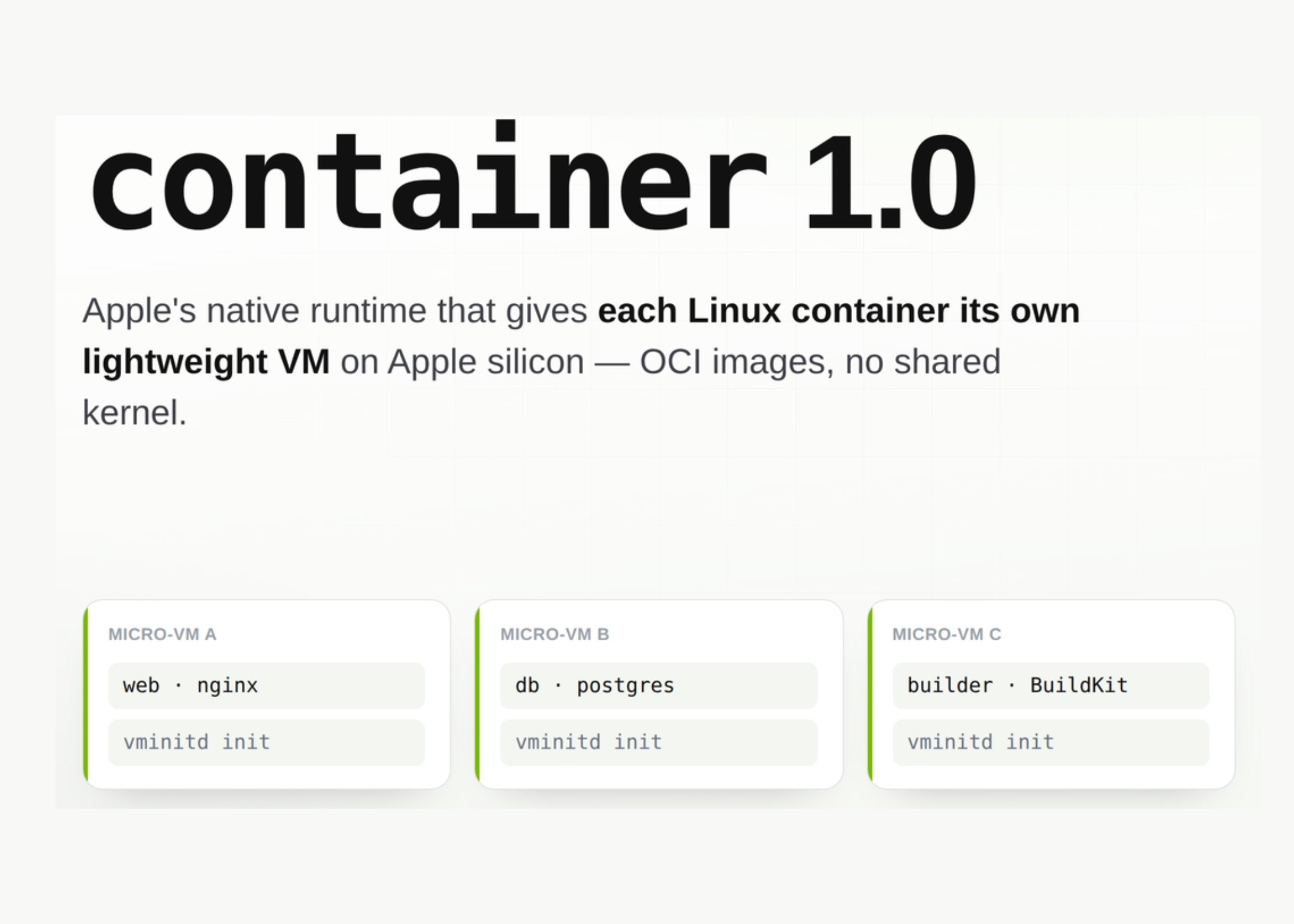
Apple’s research team recently released a container project. It is an open source command line tool written in Swift. Creates and runs Linux containers as lightweight virtual machines on the Mac. This project runs under the Apache 2.0 license and targets Apple silicon.
Containers are how you deploy replicable environments from a laptop to a data center. Apple now offers a native approach that avoids a single Linux VM that resides on Linux.
What is Apple container ?
container is a CLI tool that can be used to create images, run containers, and move images to and from repositories. It executes and generates OCI-compliant container images. So you can pull from Docker Hub or GitHub Container Registry and use those images. You can also push the images you create to any standard subscription.
container uses the open source Containerization Swift package. That package handles low-level container, image, and process management. The tool requires a Mac with Apple silicon. Intel Macs are not supported. Apple supports container in macOS 26, which adds virtualization and network enhancements. You can use it on macOS 15, but with network restrictions.
How container Using Your Containers
Most container tools for macOS use a single shared Linux VM that hosts all containers. Apple takes a different approach. container it uses a separate lightweight VM for each container you create. Apple describes three aspects of this design:
- Security: Each container has a full VM partition. A small set of core resources and dynamic libraries reduces resource consumption and attack surface.
- Privacy: You only mount the data that each VM needs, instead of sharing everything.
- Performance: These containers use less memory than full VMs. Boot times are compared to containers in a shared VM.
The runtime includes several macOS frameworks. It uses the Virtualization framework for VMs, and the vmnet framework for communication. It uses XPC for interprocess communication, introduced service management, and Keychain services for registration verification.
A control plane has several moving parts. container system start it starts container-apiserverpresenting agent. The apiserver then starts the XPC helper container-core-images with image management and local content store. It starts again container-network-vmnet for a virtual network. In each container, we start container-runtime-linuxassistant to manage each container.
Interactive Descriptor
‘;} function renderArch(mode){ if(mode===’apple’){stage.innerHTML=’
macOS · Apple silicon · Virtualization.framework
A micro-VM
‘+box(‘web (nginx)’)+box(‘vminitd init’)+’
‘+’
A micro-VM B
‘+box(‘db (postgres)’)+box(‘vminitd init’)+’
‘+’
micro-VM C
‘+box(‘build (BuildKit)’)+box(‘vminitd init’)+’
‘+’
‘; archcap.innerHTML=’Each container receives it its own lightweight VM with its kernel. Isolation is at the VM boundary, and idle containers release their traces.’; }else{ stage.innerHTML=’
macOS · One Linux VM that stays open
Shared Linux VM (single kernel)
‘; archcap.innerHTML=’All containers share one shot within a single background VM. Simple communication, but a wide area of shared attack and the constant cost of doing nothing.’; } resize(); } root.querySelectorAll(‘.mcd-seg’).forEach(functions){ s.addEventListener(‘click’,function(){ root.querySelectorAll(‘.mcd-seg’).forEach(function(x){x.classList.remove’)-active;’ s.classList.add(‘is-active’); renderArch(s.dataset.arch }); renderArch(‘apple’); // resize default: offsetHeight + 40 (each WordPress embedding) function resize(){ var h=root.offsetHeight+40; window.parent.postMessage({mtpContainerDemoHeight:h},’*’) } window.addEventListener(‘resize’,120); });
“>
Use Cases with examples
Local backend development. Start the service in its own VM, and forward the port to your loopback address.
container run -d --rm -p 127.0.0.1:8080:8000
  node:latest npx http-server -a :: -p 8000
curl
CI style reconstruction. container build starts a builder container that uses BuildKit. You can size the VM builder for heavy build.
container builder start --cpus 8 --memory 32g
container build --tag web-test:latest --file Dockerfile
Cross-architecture images for datacenter deployments. Build a single image on both Apple silicon and x86-64 servers. I amd64 the exception works under the Rosetta translation.
container build --arch arm64 --arch amd64
  --tag registry.example.com/fido/web-test:latest
It mounts data sets for analysis. Share the host folder on the container --volume. This is useful for feeding location data into a containerized function.
container run --volume ${HOME}/Desktop/assets:/content/assets
  docker.io/python:alpine ls -l /content/assets
Distinguishes untrusted or generated code. Each container runs in its own VM, not a shared kernel. That boundary equates to executable code from an agent or unknown image with minimal exposure to the host.
Hands Open: Basic Instructions
The default container resources are 1 GiB of RAM and 4 CPUs. You take them out with each run.
container run --rm --cpus 8 --memory 32g bigCheck the use of a live resource, such as top with procedures.
container stats --no-stream my-web-serverRead virtual machine startup and init logs when debugging startup.
container logs --boot my-web-serverIn macOS 26, you can create individual networks. Containers on different networks cannot reach each other.
container network create foo --subnet 192.168.100.0/24
container run -d --name web --network foo --rm web-test
By default, containers start with a limited set of Linux capabilities. He clearly tunes them out.
container run --cap-drop ALL --cap-add SETUID --cap-add SETGID alpine idVersion 1.0.0 and adds container machines. These are persistent Linux environments built with OCI images. Your home directory is included, and the login user is the same as your Mac account. The file system is saved on startup. Any image it contains /sbin/init suitable as a container machine.
Two other changes for 1.0.0 affect developers. System settings have been moved to a TOML file at ~/.config/container/config.toml. I container system property get again set subcommands have been removed. The tool also adds structured output for JSON, YAML, and TOML list again inspectautomation makes it easy.
an apple container vs Docker Desktop
| Property | an apple container |
Docker Desktop |
|---|---|---|
| A classification model | One lightweight VM per container | Shared Linux VM, shared kernel |
| Passive steps | Close to zero if nothing works | An always-on VM |
| Image format | Compatible with OCI | Compatible with OCI |
| Build an engine | BuildKit by using the VM builder | BuildKit |
| License | Apache 2.0 | Marketing goals for large organizations |
| Computer hardware | Apple silicon only | Apple silicon and Intel |
| Name / GUI | It is not built in | Yes |
| A very good fit | Single container run, native partitioning | Build a workflow, mature ecosystem |
Powers and Limitations
Power: VM partitioning for each container reduces the shared attack surface compared to a shared kernel. The cost of passive memory is low, as the fixed containers free up their own traces. OCI compatibility means your images work elsewhere without conversion. The Apache 2.0 license does not carry a paywall feature.
Limitations: Virtualization framework for macOS only supports partial memory balloon. Pages released inside a container are not always served by the host. A heavy workload may need to be restarted periodically to reduce memory usage. There is no built-in Docker Compose. macOS 15 users face connectivity limitations, and Intel Macs are not supported.
Check it out Repo here. Also, feel free to follow us Twitter and don’t forget to join our 150k+ML SubReddit and Subscribe to Our newspaper. Wait! are you on telegram? now you can join us on telegram too.
Need to work with us on developing your GitHub Repo OR Hug Face Page OR Product Release OR Webinar etc.? contact us